
Support us, you beautiful WordPress user ✍️💻🌐
The deal: you learn how to fix emojis showing as question marks on WordPress.
Now do your part and tip us now! 👍🏼
Your support helps keep these instructions and tips up to date.
Show us your love! ❤️💙
EMOJIS SHOW AS QUESTION MARKS ON WORDPRESS – HOW TO FIX IT
Have some of your emojis (on your WordPress site) turned into question marks ???
Learn how to fix emojis showing as question marks (??) on a WordPress website.
Brought to you by Mau, a WordPress expert and Digital Advertising Specialist at eDigital.
EMOJIS SHOW AS QUESTION MARKS ON WORDPRESS – HOW TO FIX IT
Have you noticed that suddenly and oddly some emojis added to your website’s blog posts or articles turned into question marks (??)?
- You have not made any changes to my WordPress website, just normal plugin updates.
- You called your hosting provider, they said they have not made any changes to the database or server.
WHICH EXACT EMOJIS HAVE TURNED TO QUESTION MARKS?
STEPS – HOW TO FIX EMOJIS THAT TURNED INTO QUESTION MARKS ON YOUR WORDPRESS WEBSITE
Below are some of the possible options emojis are showing as question marks on your WordPress website:
- Has the issue affected all, most, some or few emojis? Start by knowing that.
- If a few emojis still appear, probably your hosting provider updated the MySQL version but they forgot to change the database CharSet and Collate encoding from utf8 to the new utf8mb4, which is the new standard character encoding (4-byte UTF8) used for all emojis including the latest new emojis. If you have access to the hosting manager, you can check the Database Charset on File Manager, then, under public html, open the wp-config php folder and it should be coded there. Below is a screenshot of how the database Charset and Collate encoding should be coded:
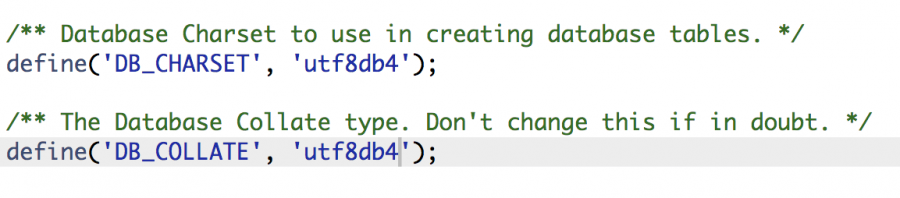
database charset code and collate encoding utf8db4
Note: The opposite could happen, your hosting server administrator updated the database Chartset and Collate to utf8db4 but they have not updated to the latest MySQL version. For CharSet utf8-db4 to work, the server must have at least MySQL version 5.3.3 or newer. If not, other issues may happen. When this happens it is usual to hear people confirming that their WordPress visual editor field goes blank (empty), the Avada theme footer (powered by widgets) disappears (You do not need to worry if you do not use the Avada theme) and some other issues may happen. Now the tricky part is that some hosting providers for some strangely stupid reason (such as Crazy domains) may tell you that websites on a shared server do not get MySQL updated to the latest version. If that’s your case, you probably will have to either fight to get your hosting provider to get the latest MySQL or just keep the utf8 instead of the utfdb4 and just live with the fact that you will not be able to add most of the emojis within the content of your website.
- Have you looked at your site from a different browser to make sure it isn’t a browser issue?
- Check your WordPress version. Make sure it is up-to-date. If not, update to the latest WordPress version and then check if the emojis are working.
- Clear your website cache. Clearing the cache may help resolve any conflicts that are causing the emojis to appear as question marks.
Trending tis week: the most popular emojis teens are using
- What were the latest WordPress plugins you have updated? Disable those plugins one by one. If the issue started after installing a new plugin or updating an existing one, the issue may be related to a recent plugin update that is causing conflicts with your website’s code. Disable each plugin one by one, then check if the emojis work.
- Old MySQL versions (older than 5.7.7) do not support 4-byte UTF8 characters, make sure your hosting provider is running the latest MySQL version (8.0 by March 2023) and update the database Charset on the wp-config php folder.
- It could be you are running an old PHP version that no longer supports emojis. Ask your hosting provider to update to the latest PHP version and check if the emojis show correctly. The latest PHP version by March 2023 is 8.2.
-
It may also be a server cache issue. If you are running a cache or optimisation plugin, refreshing the cache should do it. If your theme has a CSS cache button, try that too.
- If you are using a library for emojis for whatever reason (you should not need to) – through script tag -, the host website may be failing to load them.
- If none of the above steps works, you may need to manually edit the affected articles and delete those annoying question marks.
Hopefully, one of these solutions will work for you and you’ll be able to restore all emojis on your website.
Good luck
TIPS THAT MAY HELP
- Geopeeker.com will help you find out whether your website is live or not at different locations around the world.
- If for some reason you cannot access your website from your mobile phone or your laptop using your mobile phone’s internet connection, it may be due to a DNS (Domain Name System) issue. You will need to reset your phone’s network settings. The resetting of the network in your phone will force your phone to know that your website is up and running. On iPhone, simply go to Settings > General > Reset > Reset Network Settings. Just a heads up, the network resetting process may clear your saved Wi-Fi passwords and connections.
Marketers are reading: the importance of words in life
🎬 Conclusion
Emojis add emotional context to your WordPress website pages or blog articles, making it easier to convey feelings and emotions that might be challenging to express with words alone. You want emojis to be showing correctly on your WordPress website as they can help avoid misinterpretations and improve the overall understanding of your articles’ meaning and tone.
Final note📝: Are your marketing costs through the roof? 🚀💸
If your customer acquisition costs are climbing faster than a startup founder’s ego 📈😎 (post‑IPO champagne still in hand 🍾), and you’re hooked on paid ads like a reality TV star or a Tinder date who keeps accepting your dinner invites 🍝🍷 but never calls you back 📵💔…
If that sounds like you 👀👂🏼, you should definitely contact us 🧠💬📞
Our exclusive digital marketing strategy workshops will mercilessly dissect your marketing🔥💀, expose all the weak spots and show you how to ditch the algorithm chokehold to build a marketing engine you actually own. 🔧🚀
We’ll shake up your team’s thinking 🧠⚡, drop fresh ideas 💡🍉, and turn your marketing from “meh” 😐 to a money-making machine. 🤑💸
Ready to stop burning cash and start making it? 💥💰
Hit us up! 📲📞
We offer:
✔ Digital Marketing Strategy. Because hope is not a plan 🙃
✔ Online Ads (Google, Social, Remarketing). The art of spending money wisely for once 🎯
✔ Social Media Marketing Training. So you stop posting into the void 🕳️📉
✔ SEO Strategy & Execution. Because if Google doesn’t know you exist, do you even? 🤷♂️🔍
✔ Influencer & Celebrity Marketing. Get people with clout to talk about you 💅📢
✔ Branding & Logo Design. So you don’t look like a dodgy side hustle 💼🚫
✔ Consumer Giveaways & Competitions. Because people will do anything for free stuff 🎁
✔ Email Marketing & Drip Sequences. Slide into inboxes the right way 💌😏
✔ Conversion Rate Optimisation. Turn window shoppers into actual buyers 🛒➡️💳
Ready to start marketing like a boss? Let’s talk 🤝📞
EMOJIS TURNED TO QUESTION MARKS ON WORDPRESS – HOW TO FIX IT
was brought to you by Mau
 Mau’s a WordPress expert and Digital Advertising Specialist who delivers killer digital marketing strategy workshops and best social media training so good, even your grandma will get it.
5k+ smart marketers who love stealing good ideas receive Mau’s weekly email, while others tired of guessing use Mau’s Digital Marketing Plan and Social Media Plan templates.
Mau’s “Escaping Capitalism” trip 🌎 ✈️ is leaving questionable life choices on TikTok & YouTube