Support us, you beautiful LinkedIn user 👔🔵📈🖥️
The deal: you learn how to turn off work anniversary notifications on LinkedIn.
Now do your part and tip us now! 👍🏼
Your support helps keep these instructions and steps up to date.
Show us your love! 💛💙
HOW TO TURN WORK ANNIVERSARY NOTIFICATIONS OFF ON LINKEDIN
How to turn those annoying work anniversary notifications off on LinkedIn.
Stop receiving work anniversary notifications on your LinkedIn feed.
Brought to you by Mau, a Senior LinkedIn Marketing Specialist at eDigital.
Popular this month: the top 10 most-followed people on LinkedIn
STEPS – HOW TO TURN WORK ANNIVERSARY NOTIFICATIONS OFF ON LINKEDIN
Before you learn how to turn off work anniversary notifications on LinkedIn, let me tell you something you might find hard to admit:
LinkedIn is mugging you in broad daylight 🔫 while you thank them for the privilege.
LinkedIn algorithm shows your “viral” content to roughly the same audience who’d notice if you screamed into your office Printer: Ryan from the marketing team who does not even know your name. 😵
You own nothing 🤡 on LinkedIn.
You’re renting followers from landlords who charge you extra just to talk to your audience.
It’s like building a mansion on rented land: expensive, temporary, and the landlord can bulldoze it whenever they update their “community guidelines”. 🏠💥
Meanwhile, LinkedIn execs are swimming in pools filled with your ad spend. 🏊♂️💰
Your current situation:
❌ Zero follower data ownership 📊❌
❌ Organic reach = no-one watching! 🕵️♂️
❌ Ad costs rising faster than your therapy bills 📈💀
❌ Followers “export” button? Pure fantasy 🦄
The intervention your marketing needs:
✅ Stop being LinkedIn’s favourite ATM 🏧❌
✅ Own your audience 👑
✅ Lower your customer acquisition costs 💰
✅ Build marketing systems that own and control 🤖❤️
Throwing money at LinkedIn ads hoping for results is expensive self-harm with the worse ROI. 🔥
Ready to break up with LinkedIn’s abuse?
Book a strategy session and learn to build digital marketing that works for you, not against your bank account. 🚀
Stop renting your success. Start owning it.
Let’s craft the best digital marketing plan and social media strategy that boosts sales and customer lifetime value.
STEPS – HOW TO TURN WORK ANNIVERSARY NOTIFICATIONS OFF ON LINKEDIN
Did you have enough of those annoying LinkedIn notifications that read:
“Congratulate John Smith for 3 years at Apple“
Learn how to turn off those annoying work anniversary notifications inviting you to congratulate a LinkedIn connection by following the below steps and instructions. The below steps are for Desktop but you can also manage your notification settings from your LinkedIn App.
Follow the below steps:
- Log in to the LinkedIn account you want to turn work anniversary notifications off
- Go to LinkedIn Notification Centre
- Scroll down to find the “Network” option. Then, click on it.
- Scroll down until you find the “Work anniversaries in your network” option
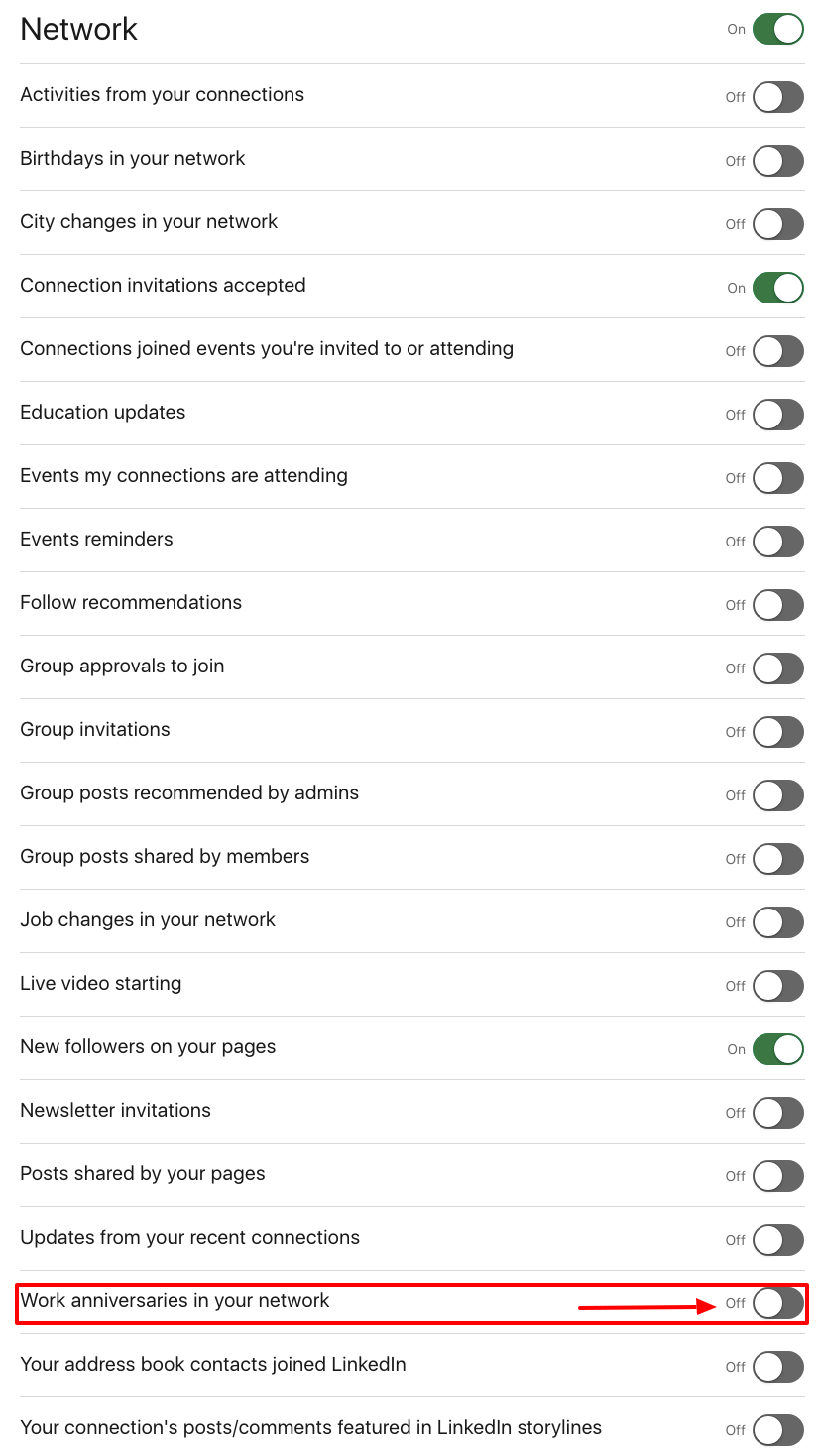
turn off work anniversaries notifications LinkedIn stop remove
- Turn the “Work anniversaries in your network” option off
- Viola! You will no longer be notified about work anniversaries of your LinkedIn network
I hear you saying: “The LinkedIn work anniversary notification is useless”?
The reality is that no one cares if you reach 1, 10 or 20 years in a particular company.
On the contrary, it would be nice to get notified of contributions the LinkedIn connections – you interact with only – have made to their communities, volunteering achievements, etc.
And now you are saying to me:
“So, means nothing the many years I helped my company make more money?”
Yes, I hear you.
Those years will only be appreciated if your role has helped people become better, healthier, safer, more educated, more compassionate and/or more giving.
People who have already made so much contribution do not need the carrot from people on LinkedIn.
The latter – more likely – do not even know you.
Popular LinkedIn articles:
- The new and most optimal image size for LinkedIn posts
- How to discover LinkedIn users nearby
- How to find your LinkedIn ID
Marketers are using some of the best LinkedIn profile cover image ideas
Conclusion
Turning off “Work Anniversary” notifications on LinkedIn is a strategy for managing distractions and customising your LinkedIn feed to align with what you want to see. It allows you to use LinkedIn more intentionally and reduce the potential negative effects of information overload and distraction.
Final note📝: Are your marketing costs through the roof? 🚀💸
If your customer acquisition costs are climbing faster than a startup founder’s ego 📈😎 (post‑IPO champagne still in hand 🍾), and you’re hooked on paid ads like a reality TV star or a Tinder date who keeps accepting your dinner invites 🍝🍷 but never calls you back 📵💔…
If that sounds like you 👀👂🏼, you should definitely contact us 🧠💬📞
Our exclusive digital marketing strategy workshops will mercilessly dissect your marketing🔥💀, expose all the weak spots and show you how to ditch the algorithm chokehold to build a marketing engine you actually own. 🔧🚀
We’ll shake up your team’s thinking 🧠⚡, drop fresh ideas 💡🍉, and turn your marketing from “meh” 😐 to a money-making machine. 🤑💸
Ready to stop burning cash and start making it? 💥💰
Hit us up! 📲
We offer:
✔ Digital Marketing Strategy. Because hope is not a plan 🙃
✔ Online Ads (Google, Social, Remarketing). The art of spending money wisely for once 🎯
✔ Social Media Marketing Training. So you stop posting into the void 🕳️📉
✔ SEO Strategy & Execution. Because if Google doesn’t know you exist, do you even? 🤷♂️🔍
✔ Influencer & Celebrity Marketing. Get people with clout to talk about you 💅📢
✔ Branding & Logo Design. So you don’t look like a dodgy side hustle 💼🚫
✔ Consumer Giveaways & Competitions. Because people will do anything for free stuff 🎁
✔ Email Marketing & Drip Sequences. Slide into inboxes the right way 💌😏
✔ Conversion Rate Optimisation. Turn window shoppers into actual buyers 🛒➡️💳
Ready to start marketing like a boss? Let’s talk 🚀👊
HOW TO STOP RECEIVING WORK ANNIVERSARY NOTIFICATIONS ON LINKEDIN
was brought to you by Mau

Mau‘s a LinkedIn marketer who delivers killer digital marketing strategy workshops and best social media training so good, even your grandma will get it.
5k+ smart marketers who love stealing good ideas receive Mau’s weekly email, while others tired of guessing use Mau’s Digital Marketing Plan and Social Media Plan templates.
Mau’s “Escaping Capitalism” trip 🌎 ✈️ is leaving questionable life choices on TikTok & YouTube