Support us, you beautiful LinkedIn user 👔🔵📈🖥️
The deal: you learn how to hide your email address on LinkedIn.
Now do your part and tip us now! 👍🏼
Your support helps keep these instructions and steps up to date.
Show us your love! 💛💙
HOW TO HIDE YOUR EMAIL ADDRESS FROM LINKEDIN CONNECTIONS – STEPS
Learn how to hide your email address on LinkedIn.
Learn how to stop showing your email address to your LinkedIn connections or anyone on LinkedIn.
Protect and secure your email address with the steps and instructions below.
Brought to you by Mau, a Senior LinkedIn Advertising Specialist at eDigital.
HOW TO HIDE YOUR EMAIL ADDRESS FROM LINKEDIN CONNECTIONS – STEPS
Is your email address hidden on LinkedIn?
By default, your primary registered LinkedIn email address is only visible on your profile to your direct connections on LinkedIn. It will also be visible to people who are your email contacts or vice versa. You can change who can see and access your email address on your LinkedIn profile from your LinkedIn Accounts “Settings & Privacy” page.
How to hide your email address from your LinkedIn connections – Steps
Follow the below steps:
Step 1: Click on the “Me“ icon at the top of your LinkedIn homepage.
Step 2: Select “Settings & Privacy” from the dropdown.
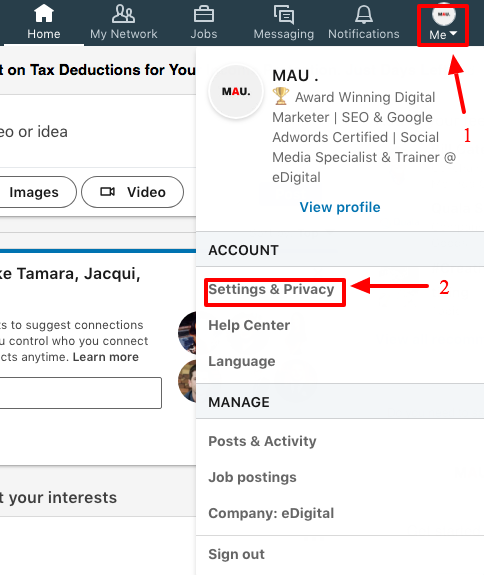
how to make email address private from LinkedIn connections steps
Marketers found useful:
- How to turn work anniversaries notifications off on LinkedIn
- How to find all the people you follow on LinkedIn
Step 3: Click on the “Visibility” tab at the top of the page.
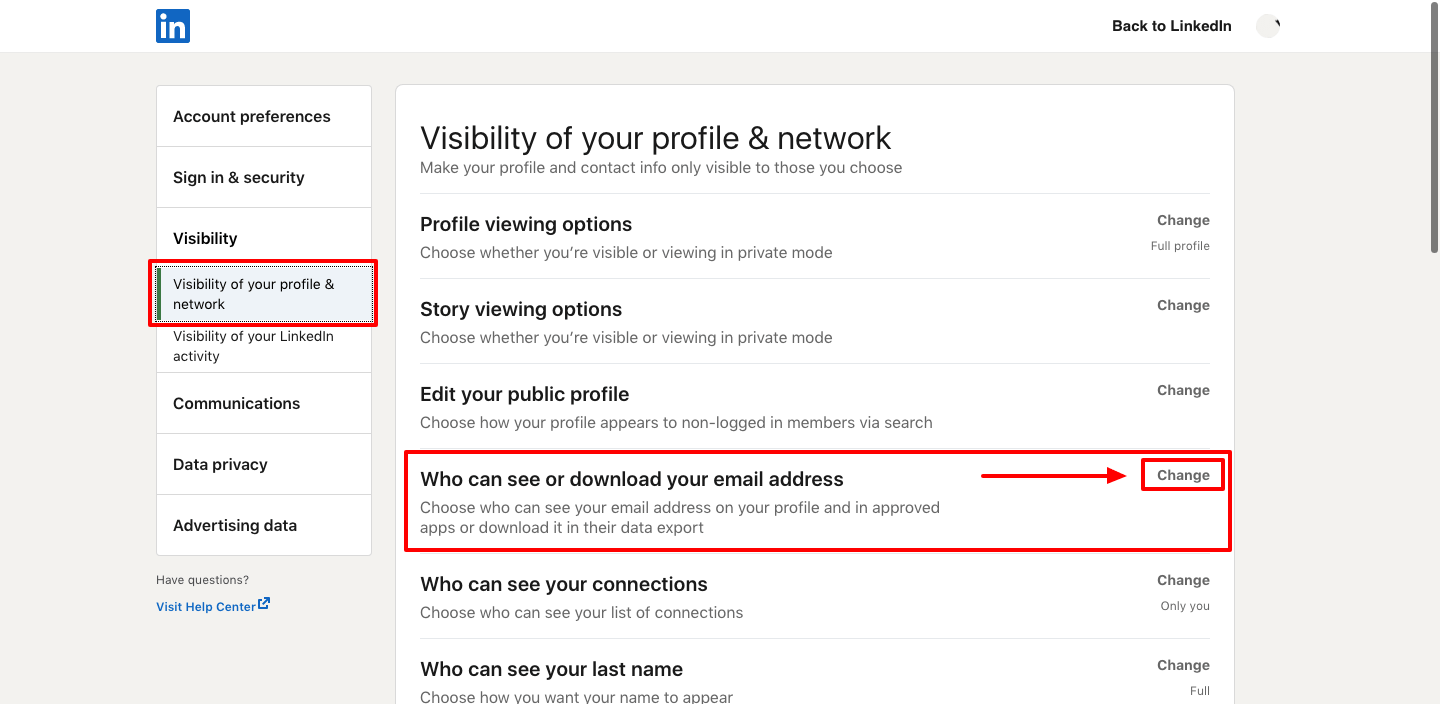
How to hide email on LinkedIn steps
Step 4: Scroll down to where it reads: “Who can see your email address” and click on the “Change” link.
⭐️ Popular read: the best LinkedIn profile cover image ideas and examples
Step 5: Select one of the following:
- Only visible to me.
- 1st-degree connections
- 1st and 2nd-degree connections
- Anyone on LinkedIn
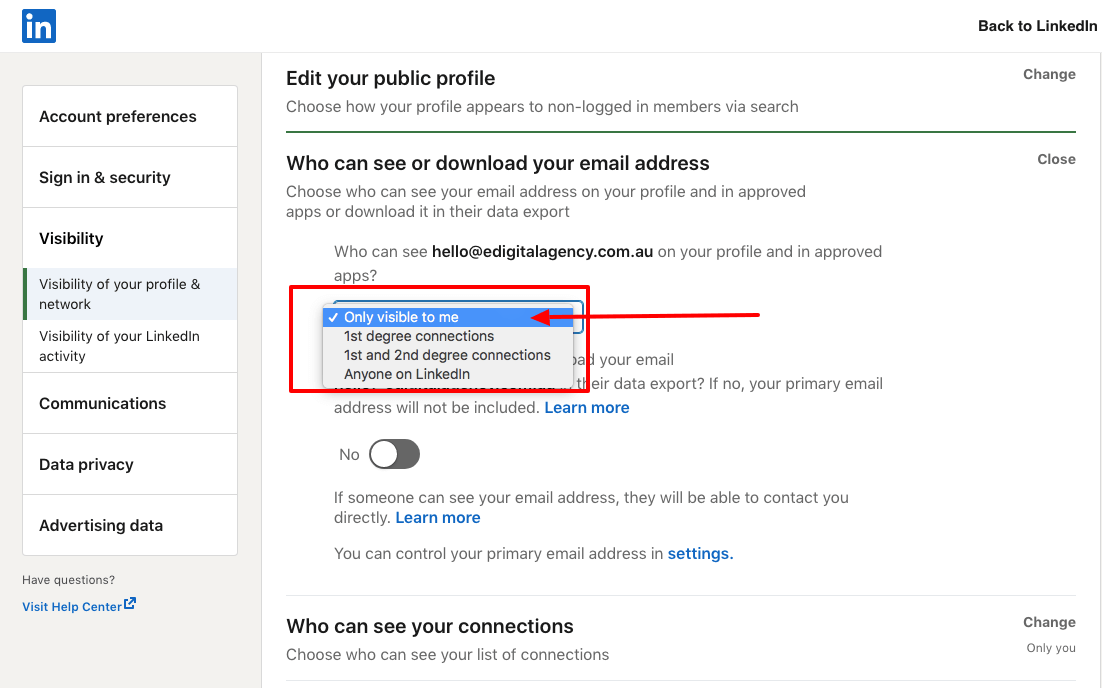
How to stop showing an email address on LinkedIn – instructions
Step 6: Click on the “Close” text link at the top right. Your changes will be automatically saved.
Linkedin users are learning how to block a company on LinkedIn
How to hide your email address from LinkedIn connections from your IOS phone – Steps
Follow the below steps:
Step 1: Tap your profile picture.
Step 2: Tap the “Settings” icon in the top right corner.
Step 3: Under the “Privacy” tab, tap “Who can see your email address“.
Step 4: Select one of the following:
- Only you – No one can see your email address.
- 1st-degree connections – Only those directly connected to you can see your email address.
- 1st and 2nd-degree connections – Only those directly connected to you and those connected to your connections can see your email address.
- Everyone on LinkedIn – Any LinkedIn member viewing your profile can see your email address.
Your changes will be automatically saved.
Step 5: “Your privacy change was successful” A green text message should appear confirming your changes are saved.
Marketers are using the new optimal image size for LinkedIn posts
How to hide your email address from your LinkedIn connections from an android phone – Steps
Follow the below steps:
Step 1: Tap your profile picture.
Step 2: Tap the “Settings” icon in the top right corner.
Step 3: Under the “Privacy” tab, tap “Who can see your email address“.
Step 4: Select one of the following:
- Only you – No one can see your email address.
- 1st-degree connections – Only those directly connected to you can see your email address.
- 1st and 2nd-degree connections – Only those directly connected to you and those connected to your connections can see your email address.
- Everyone on LinkedIn – Any LinkedIn member viewing your profile can see your email address.
Your changes will be automatically saved.
Step 5: “Your privacy change was successful” A green text message should appear confirming your changes are saved.
LinkedIn will not share your email address or other contact information with another member unless both of you choose to contact one another or your above settings indicate you are open to others seeing your email address.
Note: To avoid unwanted emails or invitations and to comply with LinkedIn User Agreement, email addresses should not be entered anywhere else on your profile.
Time to update your LinkedIn profile cover image! Checked out some of the best LinkedIn profile cover image ideas and examples.
Conclusion
Deciding whether to keep your email address private or public is of utmost importance on LinkedIn and other social media platforms, where information is easily accessible and shared. In some cases, when generic email addresses are used, you may want to keep them public. When using personal email addresses for LinkedIn that are also associated with your bank accounts, it is best to keep them private.
Final note📝: Are your marketing costs through the roof? 🚀💸
If your customer acquisition costs are climbing faster than a startup founder’s ego 📈😎 (post‑IPO champagne still in hand 🍾), and you’re hooked on paid ads like a reality TV star or a Tinder date who keeps accepting your dinner invites 🍝🍷 but never calls you back 📵💔…
If that sounds like you 👀👂🏼, you should definitely contact us 🧠💬📞
Our exclusive digital marketing strategy workshops will mercilessly dissect your marketing🔥💀, expose all the weak spots and show you how to ditch the algorithm chokehold to build a marketing engine you actually own. 🔧🚀
We’ll shake up your team’s thinking 🧠⚡, drop fresh ideas 💡🍉, and turn your marketing from “meh” 😐 to a money-making machine. 🤑💸
Ready to stop burning cash and start making it? 💥💰
Hit us up! 📲 📞
We offer:
✔ Digital Marketing Strategy. Because hope is not a plan 🙃
✔ Online Ads (Google, Social, Remarketing). The art of spending money wisely for once 🎯
✔ Social Media Marketing Training. So you stop posting into the void 🕳️📉
✔ SEO Strategy & Execution. Because if Google doesn’t know you exist, do you even? 🤷♂️🔍
✔ Influencer & Celebrity Marketing. Get people with clout to talk about you 💅📢
✔ Branding & Logo Design. So you don’t look like a dodgy side hustle 💼🚫
✔ Consumer Giveaways & Competitions. Because people will do anything for free stuff 🎁
✔ Email Marketing & Drip Sequences. Slide into inboxes the right way 💌😏
✔ Conversion Rate Optimisation. Turn window shoppers into actual buyers 🛒➡️💳
Ready to start marketing like a boss? Let’s talk 🤝📞
HOW TO HIDE YOUR EMAIL ADDRESS FROM LINKEDIN CONNECTIONS
was brought to you by Mau
Mau‘s a LinkedIn Advertising Specialist who delivers killer digital marketing strategy workshops and best social media training so good, even your grandma will get it.
5k+ smart marketers who love stealing good ideas receive Mau’s weekly email, while others tired of guessing use Mau’s Digital Marketing Plan and Social Media Plan templates.
Mau’s “Escaping Capitalism” trip 🌎 ✈️ is leaving questionable life choices on TikTok & YouTube