Support us, you beautiful LinkedIn user 👔🌐🚀📈🤝
The deal: you learn how to remove an employee from a LinkedIn company page.
Now do your part and tip us now! 👍🏼
Your support helps keep this instructions and steps up to date.
Show us your love! 💛💙
HOW TO REMOVE AN EMPLOYEE FROM A LINKEDIN COMPANY PAGE
How to remove an employee from a LinkedIn company page.
Steps and instructions to take a former employee off from a LinkedIn business page.
Brought to you by Mau, a Senior LinkedIn Marketing Specialist at eDigital.
HOW TO REMOVE AN EMPLOYEE FROM A LINKEDIN COMPANY PAGE STEPS
Alright, let’s talk LinkedIn: the place where everyone’s either pretending to be super productive or trying to impress their mom with their “director of insert vague title here” job. 🙄💼
But keeping your company page accurate is a big deal if you don’t want a bunch of random, fake employees lurking around, making your business look like a total dumpster fire. 🔥🚮
Imagine this: you suddenly, you spot a random “employee” on your company page. Except… this person has never set foot in your office, let alone worked for you. 🤔💁♀️
How did they get there?
Well, someone might’ve accidentally clicked the wrong company (because let’s face it, who even double-checks this stuff? 😅), or maybe they misspelled their own company name while trying to look all fancy. 🤦♀️ Or a fake person decided to impersonate an employee, because, you know, wreaking havoc on LinkedIn is clearly a hobby now. 🎭
Now, I know what you’re thinking: “How do I get rid of these LinkedIn freeloaders?” 🤷♂️
Well, prepare to submit your formal request to LinkedIn Customer Support and by “formal request,” I mean that you’re going to have to fill out a form and beg them to fix your page on Linkedin. 🙏
And you’ll be free from the imposter employees in no time.👌🚫
⚡️ Trending this week: the best LinkedIn profile cover image ideas
REMOVING A FAKE EMPLOYEE FROM YOUR LINKEDIN COMPANY PAGE
A LinkedIn company page admin can’t remove employees from a company page. You will need to submit a request to report inaccurate employment. The LinkedIn team will review your request and respond.
Below are the steps you need to follow to report an inaccurate employee featured on a LinkedIn company page.
Steps:
- Log into your company’s LinkedIn page.
- Click the link for the incorrectly listed employee’s profile. Note the person’s full name and the web address for his/her profile page.
- Go to the LinkedIn’s Contact Us Page.
- Copy and paste the URL of the inaccurate employee account into the form
- Explain how you know this account or other information to be inaccurate or false. List the person’s full name, the Web address for his profile page and an explanation for why he should be removed from your company page.
- Add any useful attachments or screenshots to ensure the LinkedIn support team understand who exactly needs to be removed.
- Click the “Continue…” button to submit your request. You’ll receive a confirmation email and a ticket reference number to access the Support History Web page. Customer service will contact you when the person is removed or if it requires additional information.
- Type your full name in the list box in the online form. Your full name will act as your digital signature.
- You will receive an email confirmation from Linkedin – an auto-response email – a few minutes later.
- One day after you have submitted your request, a LinkedIn Consumer Support Specialist will send you an email confirming that LinkedIn is notifying the alleged infringer. See the email below (framed in red)
- Wait until the LinkedIn Support team fix removes the fake employee from your LinkedIn company page. This might take a couple of weeks.
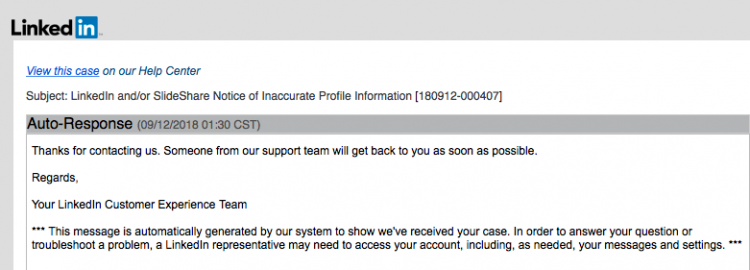
Auto Response email LinkedIn SlideShare Notice of Inaccurate Profile Information
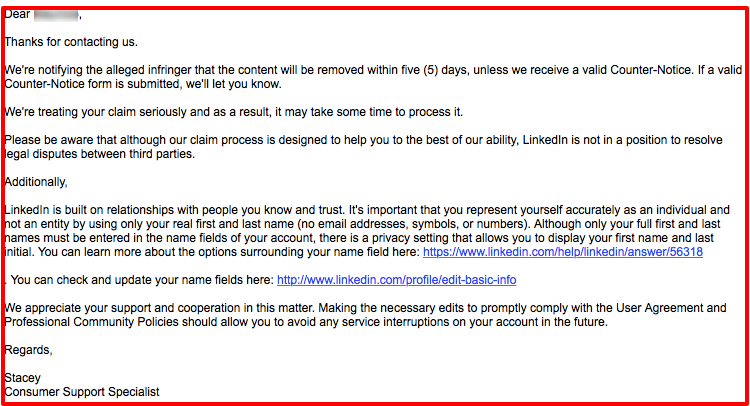
LinkedIn member removal from company page
Note: a LinkedIn representative may access your account, including your messages and your LinkedIn account settings to be able to troubleshoot an issue.
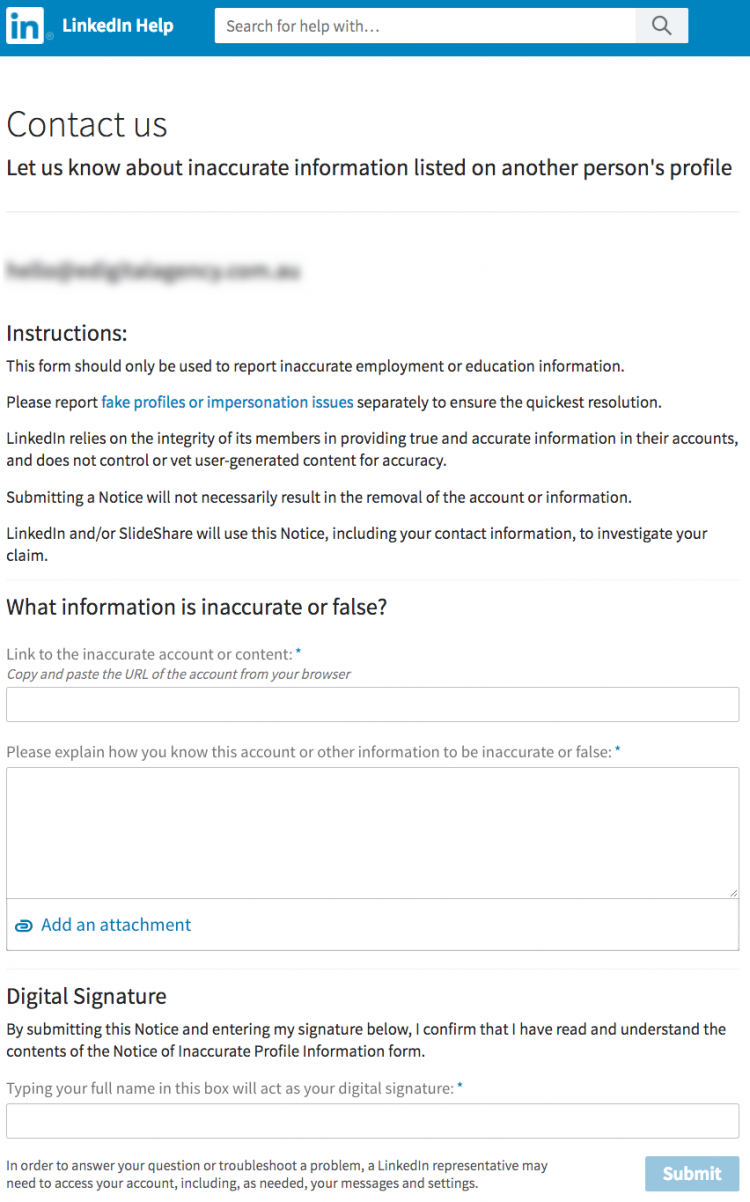
contact form Linkedin inaccurate information member profile
Have you applied for a job through LinkedIn and still waiting to hear from the recruiter? Check out the best follow-up message examples to a recruiter on Linkedin after applying for a job.
Marketers are also reading: the best LinkedIn profile cover photo image ideas and examples.
Conclusion
Removing an employee from a company page on LinkedIn is an essential step in maintaining an accurate, secure and professional online presence.
Taking off ex-employees – on your LinkedIn business page – who no longer work at your organisation ensures that the page represents the current workforce accurately.
Final note📝: Are your marketing costs through the roof? 🚀💸
If your customer acquisition costs are climbing faster than a startup founder’s ego 📈😎 (post‑IPO champagne still in hand 🍾), and you’re hooked on paid ads like a reality TV star or a Tinder date who keeps accepting your dinner invites 🍝🍷 but never calls you back 📵💔…
If that sounds like you 👀👂🏼, you should definitely contact us 🧠💬📞
Our exclusive digital marketing strategy workshops will mercilessly dissect your marketing🔥💀, expose all the weak spots and show you how to ditch the algorithm chokehold to build a marketing engine you actually own. 🔧🚀
We’ll shake up your team’s thinking 🧠⚡, drop fresh ideas 💡🍉, and turn your marketing from “meh” 😐 to a money-making machine. 🤑💸
Ready to stop burning cash and start making it? 💥💰
Hit us up! 📲
We offer:
✔ Digital Marketing Strategy. Because hope is not a plan 🙃
✔ Online Ads (Google, Social, Remarketing). The art of spending money wisely for once 🎯
✔ Social Media Marketing Training. So you stop posting into the void 🕳️📉
✔ SEO Strategy & Execution. Because if Google doesn’t know you exist, do you even? 🤷♂️🔍
✔ Influencer & Celebrity Marketing. Get people with clout to talk about you 💅📢
✔ Branding & Logo Design. So you don’t look like a dodgy side hustle 💼🚫
✔ Consumer Giveaways & Competitions. Because people will do anything for free stuff 🎁
✔ Email Marketing & Drip Sequences. Slide into inboxes the right way 💌😏
✔ Conversion Rate Optimisation. Turn window shoppers into actual buyers 🛒➡️💳
Ready to start marketing like a boss? Let’s talk 🚀👊
HOW TO REMOVE AN EMPLOYEE FROM A LINKEDIN COMPANY PAGE
was brought to you by Mau

Mau’s a LinkedIn marketer who delivers killer digital marketing strategy workshops and best social media training so good, even your grandma will get it.
5k+ smart marketers who love stealing good ideas receive Mau’s weekly email, while others tired of guessing use Mau’s Digital Marketing Plan and Social Media Plan templates.
Mau’s “Escaping Capitalism” trip 🌎 ✈️ is leaving questionable life choices on TikTok & YouTube