Support us, you beautiful PayPal user 💸💳📲🔵🅿️
The deal: you get PayPal customer service contact details.
Now do your part and tip us now! 👍🏼
Your support helps keep these contact details up to date.
Show us your love! 💙💙
HOW TO CONTACT PAYPAL CUSTOMER SERVICE IN 2026
How to easily contact and find PayPal phone numbers or email addresses in Australia, the USA and the UK in 2026.
Find PayPal customer service and support details for refunds, etc.
Brought to you by Mau, a PayPal Specialist at eDigital.
HOW TO CONTACT PAYPAL CUSTOMER SERVICE IN 2026
You can call PayPal by clicking “Call Customer Support” near the top of the page in the PayPal Help Center.
Click on the links provided below to contact PayPal.
When you click “Call customer support” and log in to your PayPal account PayPal will provide you with a specific number and a one-time passcode. The passcode will PayPal confirm your identity, so they can help you faster.
Note: the code expires after one hour. You can call as a guest if you don’t have a PayPal account or are locked out of it.
PAYPAL CUSTOMER SERVICE PHONE NUMBER AUSTRALIA
PayPal Customer service in Australia is available only Monday to Friday 8 am to 8 pm Australian Eastern Standard Time.
Before you call PayPal customer service, make sure you:
- Call from the phone number your PayPal account is linked to.
- Have the last 4 digits of your bank account linked to your PayPal account.
PayPal Australia free customer service number: +61 2 8223 9500
PAYPAL CUSTOMER SERVICE PHONE NUMBER the USA
USA (America) Phone number: 1 888 221 1161
If calling outside the USA: 1 402 935 2050
PayPal Customer Service hours USA:
Mon-Fri 5:00 AM to 10:00 PM PT
Sat-Sun 6:00 AM to 8:00 PM PT
For calls about Limitations, PayPal Debit Card, and Business Support:
Mon-Fri 5:00 AM to 8:00 PM PT
Sat-Sun 6:00 AM to 6:00 PM PT
PAYPAL CUSTOMER SERVICE PHONE NUMBER UK
If you have any questions, contact the PayPal UK customer support team at 020 8080 6500* or 0800 358 9448
PAYPAL CUSTOMER SERVICE EMAIL
If you want to email PayPal customer service, please follow the below steps:
- Click “Message Center”, then
- Click “Compose” in the top right corner to create a new email. You will have to be logged in.
There is no specific PayPal customer service email address available.
If your account is a PayPal Australia account, you can try service@paypal.com.au. This address is the one used for automated emails by Paypal Australia Customer Service, this email address has not been confirmed to be checked by a customer service agent. You can give it a try and let us know.
PAYPAL FACEBOOK PAGE AUTOMATED RESPONSE
Alternatively, you can contact them via the PayPal Facebook page. You will get an automated response the second you write to them, however, a customer service representative will answer your question within a day.
When you send a message to PayPal via their Facebook page you will get this auto Reply:
“Thanks for messaging us. Due to a high number of messages, we may take a while to reply. Please send us your email. If your inquiry is urgent please try the PayPal Community: http://bit.ly/1W9lsCl or contact us here: http://bit.ly/2cdgK0W”
HOW TO CONTACT PAYPAL FOR A REFUND REQUEST
FOR PAYMENTS MADE WITH YOUR CARD (NOT PAYPAL ACCOUNT)
- Send the seller an email and ask the seller to go to the “Transaction Details” PayPal page for your transaction and click “Issue a refund”.
FOR PAYMENTS MADE WITH YOUR PAYPAL ACCOUNT
- Login to PayPal.
- Go to the “Activity” tab
- Click on “All transactions”
- Filter by “Payments sent”
- Find the transaction you want to request a refund”
- Click on “Refund”
- Select a reason for a refund
- Submit your request.
Note: You can request a refund up to 180 days after you pay for your item. If you sent a payment, but it’s still pending, you can cancel it on your Activity as long as you see the “Cancel” button next to it. If the payment isn’t claimed within 30 days, it will be automatically refunded to you.
I DID NOT RECEIVE THE PRODUCT
For products you did not receive, you can contact the seller and ask for a refund. If your seller doesn’t agree to refund your money, you may be able to open a dispute in the PayPal Resolution Center.
INCORRECT PRODUCT
If you received something that doesn’t match the seller’s description, you can contact the seller and ask for a refund. If your seller doesn’t agree to refund your money, you may be able to open a dispute in the PayPal Resolution Center.
NON AUTHORISED PAYMENT
If you have been charged for a payment you did not authorise, you can contact the seller and ask for a refund. If your seller doesn’t agree to refund your money, you may be able to open a dispute in the PayPal Resolution Center.
CAN NOT LOG IN – I NO LONGER HAVE A PHONE NUMBER AND PAYPAL WANTS ME TO TYPE A PASSCODE SENT TO MY PHONE
To solve that issue, you need to call PayPal and follow the “Reset password” option.
What happens then:
- The PayPal automated phone operator will ask for the primary phone number you used when setting up your PayPal account, you need to type that number.
- You will be asked for the last four digits of your bank account. Have these numbers ready.
- You will be given a “five-digit” passcode.
- At the same time, you will receive an email with a link to a “reset password”.
- Click on the link and type that “five-digit” passcode.
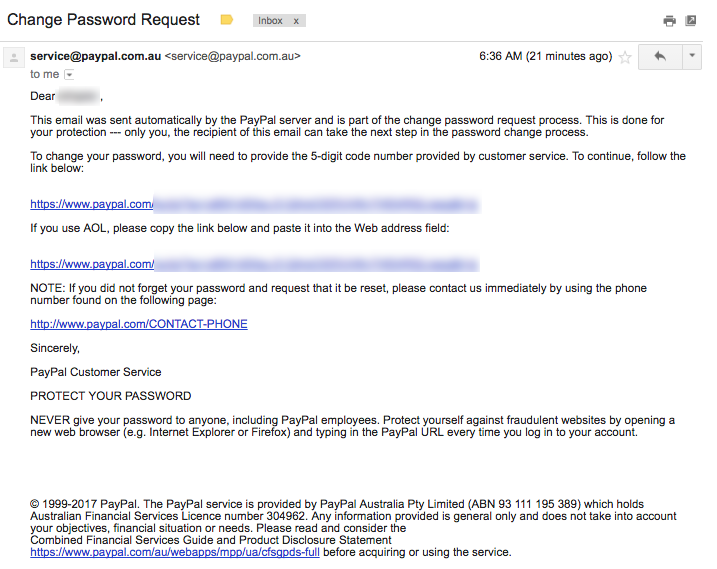
PayPal change password request an automated email
- Type the “five-digit” passcode
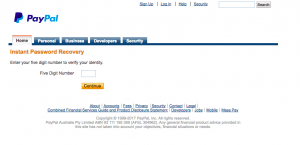
PayPal reset password enter the “five-digit” passcode screenshot
- Choose a new password and answer two security questions. (You gave the answers when setting up your account)
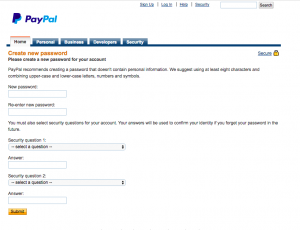
PayPal create new password screenshot security questions
- Once you click submit and it is all good, you should be automatically taken to the PayPal login page.
- Type your username (email address) and the new password.
- Viola! You should now be login 🙂
WRITE ALL THE DETAILS ABOUT YOUR PAYPAL ISSUE
Before you contact PayPal ensure you have all the below details in hand so when they read your enquiry they can process it as fast as possible. Some of the most common information PayPal needs to resolve your issue is:
- Your PayPal email address
- Your current location (country and city)
- Your exact issues – describe it with much detail as possible (when, what, where, how, what have you done to try to fix it, what you have not done), How exactly the issue is affecting your PayPal transactions?
- Your expected resolution – How exactly would you like PayPal to solve the issue?
- When do you want the issue to be solved? Is it urgent or can you wait a few days?
- Is there any phone number and email PayPal can contact you? It is good to confirm these to PayPal.
PAYPAL CUSTOMER RESPONSE VIA FACEBOOK
“Hello, I’m sorry to hear that you are having trouble logging in. I know I would be concerned too if I was in your position. No worries as I will do what I can to help you out. Based on the issue you are running into, you will need to give us a call so that our phone representatives can assist you in regaining access to your account. Please can you provide me with your PayPal email address and the country in which your account is registered? This way, I can give you the best number to call. Thank you for your patience” Ada
CAN PAYPAL CUSTOMER SUPPORT CALL YOU VIA WHATSAPP OR SKYPE?
The PayPal customer support team cannot call you through WhatsApp or Skype number.
PAYPAL REVERSE CHARGES PHONE NUMBER
PayPal does not offer a reverse charge phone number. However, in extreme circumstances, PayPal can give you a call to a nominated number in case you do not have access to a cell phone number (mobile phone number). An example of this is when you are travelling overseas and you might rely on a “data plan” only SIM card. PayPal can call a nominated number. For example a friend’s phone number or your hotel phone number at a specific time.
PAYPAL INACTIVITY “DORMANT” FEE
If you have a long-forgotten PayPal account, sign in before a year of inactivity is completed to avoid a fee.
SOMEONE TOOK MONEY FROM MY PAYPAL ACCOUNT. HOW TO GET IT BACK
Bad news, in some cases, PayPal customer service cannot reverse unauthorised transactions right away. You will need to file a formal case and if it is not successful, you can file an appeal and ask PayPal to show how it determined the transaction to a stranger was authorised. You can ask PayPal to process your case under the PayPal Protection plan.
HOW TO SUBMIT AN OFFICIAL COMPLAINT TO PAYPAL – AUSTRALIA ONLY
If you are in Australia, you can report complaints about PayPal services for free by emailing: auexecutiveescalations@paypal.com or calling 1800 073 263 or +61 2 8223 9500.
You can also send a letter to:
Mail Customer Advocacy Manager
PayPal Australia
GPO Box 351 Sydney NSW 2001
HOW TO CONTACT PAYPAL CEO
PayPal Chief Executive Officer contact details and email:
Alex Chriss
President and CEO
2211 North First Street
San Jose, CA 95131
Email Alex today!
Have your say! 🗣
💬 Users’ comments about PayPal customer support contact details:
“PayPal users hunting for the correct customer support contact details like it’s a secret society password 🔍🕵️♀️ because apparently, ‘Call us anytime’ means ‘Good luck, you’ll need it’ 📞💀📧. Somewhere out there, a support agent’s just sipping coffee laughing at us all ☕😂 from its cubicle” Amy Chriss
Send us your comment and get your opinion published!
🎬 Conclusion
Patience is your best friend when trying to get an answer from PayPal.
The PayPal support team surely will get back to you.
You just need to wait as they may have thousands of other enquiries to respond to.
Final note📝: Are your marketing costs through the roof? 🚀💸
If your customer acquisition costs are climbing faster than a startup founder’s ego 📈😎 (post‑IPO champagne still in hand 🍾), and you’re hooked on paid ads like a reality TV star or a Tinder date who keeps accepting your dinner invites 🍝🍷 but never calls you back 📵💔…
If that sounds like you 👀👂🏼, you should definitely contact us 🧠💬📞
Our exclusive digital marketing strategy workshops will mercilessly dissect your marketing🔥💀, expose all the weak spots and show you how to ditch the algorithm chokehold to build a marketing engine you actually own. 🔧🚀
We’ll shake up your team’s thinking 🧠⚡, drop fresh ideas 💡🍉, and turn your marketing from “meh” 😐 to a money-making machine. 🤑💸
Ready to stop burning cash and start making it? 💥💰
Hit us up! 📲📞
We offer:
✔ Digital Marketing Strategy. Because hope is not a plan 🙃
✔ Online Ads (Google, Social, Remarketing). The art of spending money wisely for once 🎯
✔ Social Media Marketing Training. So you stop posting into the void 🕳️📉
✔ SEO Strategy & Execution. Because if Google doesn’t know you exist, do you even? 🤷♂️🔍
✔ Influencer & Celebrity Marketing. Get people with clout to talk about you 💅📢
✔ Branding & Logo Design. So you don’t look like a dodgy side hustle 💼🚫
✔ Consumer Giveaways & Competitions. Because people will do anything for free stuff 🎁
✔ Email Marketing & Drip Sequences. Slide into inboxes the right way 💌😏
✔ Conversion Rate Optimisation. Turn window shoppers into actual buyers 🛒➡️💳
Ready to start marketing like a boss? Let’s talk 🤝📞
CONTACT PAYPAL CUSTOMER SERVICE IN 2026
was brought to you by Mau

Mau’s a PayPal Specialist who delivers killer digital marketing strategy workshops and best social media training so good, even your grandma will get it.
5k+ smart marketers who love stealing good ideas receive Mau’s weekly email, while others tired of guessing use Mau’s Digital Marketing Plan and Social Media Plan templates.
Mau’s “Escaping Capitalism” trip 🌎 ✈️ is leaving questionable life choices on TikTok & YouTube